The 5 Best iPad Styluses on Amazon in 2026
As an Amazon Associate we may earn from qualifying purchases. Our picks are independently researched, written by TwelveTabs AI and never sponsored.
The top picks
- An active pen with palm rejection and a 15-hour charge: JAMJAKE Stylus Pen for iPad
- A double-tap pen with two built-in magnets: Metapen A8 Stylus Pen for iPad
- A pen that charges in 13 minutes and has tilt sensitivity: DIGIROOT iPad Pencil
- Apple's own pen, with a USB-C connector: Apple Pencil (USB-C)
- A battery-free pack that works on any touchscreen: 2-in-1 Capacitive Stylus 5-Pack
Our top pick is the JAMJAKE Stylus Pen for iPad, an active, rechargeable pen with palm rejection whose listing names iPad models from 2018 to 2026 and says older ones are not supported. We read 48 Amazon search cards for “ipad stylus”, set aside the sponsored ones and compared 10 contenders on their own pages. Five stayed, and Wirecutter’s top pick for the newest iPad Air and Pro, the Apple Pencil Pro, is in the comparison table. The Metapen A8 connects with a double tap and attaches with magnets, the DIGIROOT iPad Pencil lists a 13 minute charge, the Apple Pencil (USB-C) is Apple’s own pen with a USB-C connector and the 2-in-1 Capacitive Stylus 5-Pack needs no charging at all.
Wirecutter’s other top pick, the Apple Pencil (1st generation), has no new listing on Amazon: our searches found only a renewed copy, so it is named here with no link. Every pick below names iPad compatibility in its listing, and each section says which models, from the listing text we read.
How this pick was made
JAMJAKE Stylus Pen for iPad is the top pick. This is the work behind that choice.
- 48Amazon search results read, across 1 search
- 10finalist pages read in full
- 38shopper reviews read
- 2expert sources cross-checked: Apple Support, Goodnotes
Run on October 2, 2026. AI read the listings and what shoppers say, then wrote this guide. Full method and limits
Our picks in detail

JAMJAKE Stylus Pen for iPad
Best for: An active pen with palm rejection and a 15-hour charge
- $15.99
- 4.4 (102,730 reviews)
- 10K+ bought last month
- ★ Amazon's Choice
- Pros Palm rejection, per the listing
- Cons The listing says it does not work with iPad models before 2018
Prices and ratings as of October 2, 2026.
Pros, cons and what reviewers say

Metapen A8 Stylus Pen for iPad
Best for: A double-tap pen with two built-in magnets
- $15.99
- 4.4 (60,215 reviews)
- 10K+ bought last month
- ★ Amazon's Choice
- Pros Double-tap power switch with no Bluetooth pairing, per the listing
- Cons Amazon's summary is mixed on battery life, compatibility, writing performance and durability, and negative on reliability
Prices and ratings as of October 2, 2026.
Pros, cons and what reviewers say

DIGIROOT iPad Pencil
Best for: A pen that charges in 13 minutes and has tilt sensitivity
- $9.99
- 4.6 (10,131 reviews)
- 10K+ bought last month
- ★ Amazon's Choice
- Pros 13 minute charge for up to 9 hours, per the listing
- Cons Amazon's summary is mixed on durability, with some noting 6 to 8 hours of use and others quick tip wear
Prices and ratings as of October 2, 2026.
Pros, cons and what reviewers say

Apple Pencil (USB-C)
Best for: Apple's own pen, with a USB-C connector
- $69.98
- 4.5 (12,428 reviews)
- 10K+ bought last month
- Pros Made by Apple for iPad, per the listing
- Cons Amazon's summary is mixed on compatibility, value, charging and durability
Prices and ratings as of October 2, 2026.
Pros, cons and what reviewers say
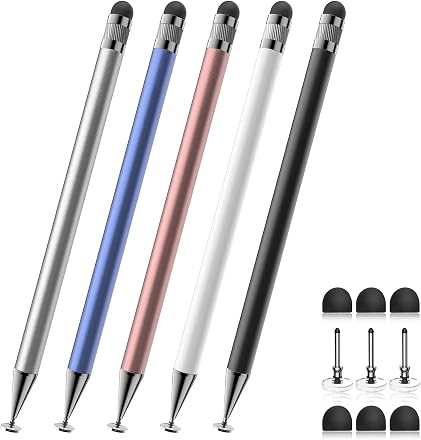
2-in-1 Capacitive Stylus 5-Pack
Best for: A battery-free pack that works on any touchscreen
- $9.99
- 4.6 (10,587 reviews)
- 10K+ bought last month
- Pros No charging needed, per the listing
- Cons The listing says it has no pressure sensitivity and no palm rejection
Prices and ratings as of October 2, 2026.
Pros, cons and what reviewers say
Expert picks

Apple Pencil Pro
Wirecutter's top pick for the newest iPad Air and Pro, shown next to ours so you can compare. Our picks may differ from the experts'.
- $99.00
- 4.5 (10,493 reviews)
- 10K+ bought last month
Compare the picks
Prices and ratings as of October 2, 2026. They change often, so check today's price on Amazon.
| Picture | Product | Outcome | |||||
|---|---|---|---|---|---|---|---|
| 1 |  | JAMJAKE Stylus Pen for iPadType: Active, rechargeable · iPad models: 2018-2026 models | Price $15.99 | 10K+ bought last month | Rating 4.4 | 102,730 reviews | Winner. Best for: An active pen with palm rejection and a 15-hour charge |
| 2 |  | Metapen A8 Stylus Pen for iPadType: Active, rechargeable · iPad models: 2018-2026 models | Price $15.99 | 10K+ bought last month | Rating 4.4 | 60,215 reviews | Best for: A double-tap pen with two built-in magnets |
| 3 |  | DIGIROOT iPad PencilType: Active, rechargeable · iPad models: 2018-2025 models | Price $9.99 | 10K+ bought last month | Rating 4.6 | 10,131 reviews | Best for: A pen that charges in 13 minutes and has tilt sensitivity |
| 4 |  | Apple Pencil (USB-C)Type: Active, rechargeable · iPad models: Pro, Air, mini, iPad 10th gen | Price $69.98 | 10K+ bought last month | Rating 4.5 | 12,428 reviews | Best for: Apple's own pen, with a USB-C connector |
| 5 | 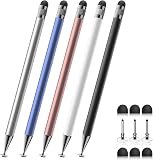 | 2-in-1 Capacitive Stylus 5-PackType: Capacitive, no charging · iPad models: iPad, iPad Air, iPad mini | Price $9.99 | 10K+ bought last month | Rating 4.6 | 10,587 reviews | Best for: A battery-free pack that works on any touchscreen |
 | Apple Pencil Pro | Price $99.00 | 10K+ bought last month | Rating 4.5 | 10,493 reviews | Wirecutter's top pick for the newest iPad Air and Pro |
How to choose a stylus for your iPad
Apple Support and Goodnotes set out what matters, and we add what each listing names.
Start with your iPad model. Apple’s compatibility page lists which Apple Pencil works with which iPad, and Goodnotes calls the Apple Pencil (USB-C) the most widely compatible model for iPads with a USB-C port. The third-party pens name iPad years instead: the JAMJAKE and the Metapen A8 list 2018 to 2026 models, and the DIGIROOT iPad Pencil bullet lists 2018 to 2025. The capacitive 5-pack lists iPad, iPad Air and iPad mini with no generations.
Check for palm rejection. Goodnotes says palm rejection lets you rest your hand on the screen while you write. The JAMJAKE, the Metapen A8 and the DIGIROOT Pencil list it, and the capacitive 5-pack listing says it has none.
Know what sensitivity you get. Goodnotes notes that the Apple Pencil (USB-C) and the JAMJAKE have no pressure sensitivity. The DIGIROOT Pencil listing names tilt sensitivity, and the Apple Pencil (USB-C) listing names tilt sensitivity and low latency. Goodnotes lists the Apple Pencil Pro’s extra features as Find My, squeeze, barrel roll and double tap, and Apple Support limits it to the newest iPad Pro, iPad Air and iPad mini models. Wirecutter’s top pick for those iPads is the Apple Pencil Pro.
Decide between active and capacitive. An active pen has a battery and a charge time: the JAMJAKE lists 15 hours of work from a 5 to 15 minute charge, the Metapen A8 lists up to 10 hours from a 30 minute charge and the DIGIROOT Pencil lists up to 9 hours from a 13 minute charge. A capacitive pen has no battery and works like a fingertip.
What we left out, and why
Of the 48 result cards, 32 were not sponsored, and 35 different products showed up. We opened 10 product pages, kept 5 and added Wirecutter’s top pick for the newest iPad Air and Pro to the table. Four more were left out:
- Metapen Pencil Air8 for Apple iPad (B0DDPMQJVH). It is a second active Metapen pen, and the Metapen A8 is the Metapen pick.
- Two unbranded iPad pencils (B0B7535QC3 and B0H3KXPKBZ). Both show one 9,783 rating total, the same Amazon summary and the same top reviews on two different titles, and one title says no Bluetooth setup while the shared summary says it connects via Bluetooth, so we could not tell which pen the figures describe.
- DIGIROOT 4 PCS Universal Stylus (B09CDCN7VS). It is a second capacitive pack, and the capacitive 5-pack already covers that need.
Wirecutter’s other top pick, the Apple Pencil (1st generation), has no new listing on Amazon: two searches found only a renewed copy, which is not a new offer, so it has no link and no row in the table. Wirecutter’s top pick for the newest iPad Air and Pro, the Apple Pencil Pro, is in the comparison table, labelled. Its listing names the iPad Pro 13-inch and 11-inch (M5 and M4), the iPad Air (M2, M3 and M4) and the iPad mini (A17 Pro).
How we researched
On October 2, 2026 we read the first two pages of Amazon's results for “ipad stylus”: 48 result cards, 32 of them organic listings. AI compared them, read the Amazon pages of 10 contenders, set aside a second Metapen pen, two unbranded pens that share one rating total on different titles and a second capacitive pack, and chose five styluses, with Wirecutter's top pick for the newest iPad Air and Pro added to the table. AI wrote this guide from that research.
Listings change: we read them on October 2, 2026, and a model, color or seller may differ today. The JAMJAKE and Metapen A8 listings share a rating total with other colors or listings of the same pen, so a figure may cover a color other than the one shown. Our reading kept about the first 200 characters of each listing bullet, so a compatible iPad model may exist that the listing text we read does not name. Wirecutter's other top pick, the Apple Pencil (1st generation), has no new listing on Amazon.
Prices, ratings and review counts come from Amazon and were read on October 2, 2026.
Sources
- Apple Support: Apple Pencil compatibility, read October 2, 2026
- Goodnotes: The best styluses for note-taking on the iPad, read October 2, 2026
- Wirecutter's top pick for the newest iPad Air and Pro
Frequently asked questions
Do you need an Apple Pencil for an iPad?
No. Goodnotes’ list of note-taking styluses includes pens from several brands besides Apple, and every pick here names the iPad models it works with in its listing. Check Apple’s compatibility page for your iPad first.
Which Apple Pencil works with which iPad?
Apple Support lists each pencil against the iPad models it works with. The Apple Pencil Pro works with the iPad Pro 13-inch and 11-inch (M4 and M5), iPad Air (M2, M3 and M4) and iPad mini (A17 Pro). The Apple Pencil (USB-C) works with those and with earlier iPad Pro and iPad Air models, the iPad (A16 and 10th generation) and the iPad mini (6th generation).
What does a capacitive stylus do?
A capacitive stylus works like a fingertip and has no battery. The capacitive 5-pack listing says it has no pressure sensitivity or palm rejection, so it suits tapping, scrolling and light note-taking better than drawing.
How did TwelveTabs choose these styluses?
We began with Amazon’s own results for “ipad stylus”, then read each contender’s page and set aside repeats of the same pen, listings whose rating totals sit on two titles and listings that did not name iPad compatibility. The five that remain are described from their listings and Amazon’s summaries of them.
Related guides
All Tech guides

Looking for another product?
Run a real-time search on Amazon and find the perfect listing.